Tag Archive | "datainherit"

Tags: ,

DSwiss Launches SecureSafe, Combines Storage With DataInherit Service

Posted on 19 October 2011 by Evan Carroll

DSwiss AG, the specialist providers of high-security Internet services, announced today the launch of SecureSafe, a new service incorporating their existing DataInherit service. The launch of the new online service, new iPad app and enhanced iPhone app offers users around the world increased security, functionality and mobility.

In addition to the new name and look of the service, SecureSafe also includes some notable enhancements such as: accessibility to the file safe not only from a browser but also via the iPhone or iPad app; a SecureViewer™ that provides guaranteed security when viewing documents on a PC; and additional security based on Apple’s recently launched iOS5 platform. DataInherit remains as a feature of the new service guaranteeing users long-term storage and preservation of their data.

“Over the last year we have expanded our footprint to include banking institutions as our services provide an innovative extension to existing e-banking offerings. With the new name SecureSafe we underline the fact that our Internet data safe is the digital safe deposit box of the future providing an electronic version of the traditional bank vault,” explains Christian Schwarzer, CEO of DSwiss.

With SecureSafe, customers can still choose from a variety of account options to suit their particular needs such as the entry level ‘SecureSafe FREE’ up to the premium option, ‘SecureSafe GOLD’. The enhanced usability and features ensure that there is a package to suit every level of user with an underlying assurance of maximum security which is what DSwiss has become renowned for.

Comments (0)

Tags:

A Low-Effort Approach to Digital Estate Planning

Posted on 28 August 2011 by Evan Carroll

If you’ve heard us talk about digital estate planning before, we always end the talk with an easy way out. It goes something like this. “If you do nothing else, make sure you inventory your most important digital accounts, record your user names and passwords, and then have a conversation with a trusted friend of loved one and tell them how to find it.” This is our way of helping you avoid benign neglect and actually do something today to handle your digital estate planning. In short, we know it’s a lot of work and we’re trying to make it easier for you to get started.

On the other side of things, we continually praise digital estate planning services that 1. make it easier for users to complete the process and 2. offer value during life and not just after death. In that spirit, here’s an idea to make planning a bit easier.

If you’re comfortable with saving your passwords in your Web browser, you can use various utilities to export the list of passwords to a spreadsheet. You can use that as a basis for your digital asset inventory or you might be able to upload the list to a digital estate planning service of your choice. You’ll still need to express your wishes for each account and make sure that your executor is notified about the inventory, but this will help you get started.

What you should do:

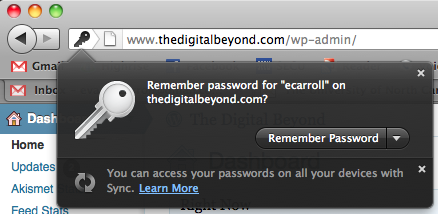
1. As you use the Web, save your passwords. Many Web browsers offer a simple way to do so. Here’s an example of the message you’ll see in Firefox.

Remember password dialog in Firefox

Remember password dialog in Firefox

2. After about a week of saving passwords you’ll probably have a list of the online accounts you use most frequently. You can preview the list in Firefox by clicking Preferences > Security > Saved Passwords (or Options > Security if you use Windows). You’ll want to check and make sure you have your important accounts listed.

3. Export your passwords. In Firefox you can use the Password Exporter add-on to create a CSV file of your passwords. This file can be opened in almost every spreadsheet application, like Excel.

4. Copy this information into your digital asset inventory (we have templates: Excel, Google Docs) or you can look into importing the information into your digital estate planning service. If you use DataInherit, they have instructions for doing so here.

5. Include your wishes in your inventory or in your digital estate planning service. Repeat this process from time to time to capture new accounts or those you use less frequently.

If you a browser other than Firefox, here’s how you can find your passwords:

Safari or Chrome for Mac: Go to the Applications folder > Utilities and open Keychain Access. Choose Passwords to see a list of saved passwords from your browser.

Chrome for Windows: Go to the Tools menu > Options > Minor Tweaks tab. In the Passwords section, click the Show saved passwords button.

Internet Explorer for Windows: In Internet Explorer, there are no free or built in password recovery features. We haven’t tried it ourselves, but there is Passcape Internet Explorer Password Recovery.


Comments (0)

Tags: , ,

Digital Afterlife Industry Roundup

Posted on 20 August 2011 by Evan Carroll

Dead Man’s Switch Beta

Earlier this week Dead Man’s Switch released a beta version. In an email to users founder Stavros Korokithakis announced the beta and hinted at new features to come.

The new version only contains about the same functionality as the old one, for now, but we would appreciate your help in testing it. We have planned for it a multitude of features, such as configurable intervals, file attachments, different ways of checkin, etc, but we need your help to make sure that everything is working properly.

We can only speculate that the underlying code received a rewrite to serve as a foundation for new features to come.

DataInherit Password Import For Firefox

The folks over at DataInherit tweeted about a quick and easy way to get started with their service by exporting saved passwords from Firefox. It’s a great way to get started, but also a great opportunity to remember those accounts that you may have forgotten about. Detailed instructions are available on their website.

World Without Me

World Without Me is a new digital estate planning and posthumous email service that’s in closed beta right now. Based in India, the service offers “Dispatches” as emails scheduled for the future (not just at death) and a “Vault” for storing usernames and passwords. More interesting is the “Footprint” component, which is an aggregation and archive service for social media:

It’s your Journal that treasures everything you did and thought about. Archive you digital footprint to create your autobiography on the go. Aggregate everything digital of significance (Facebook status updates, Tweets, Emails, and Documents) and share it with only the ones that matter.

Our email boxes are full of messages from new digital afterlife services. We’ll be adding those to our growing Digital Death and Afterlife Online Services List soon. If you have any industry news to share, feel free to drop us a line.

Comments (0)

Tags:

Value now, value later from DataInherit

Posted on 18 July 2010 by Evan Carroll

DataInherit iPhone Password ListOne of the things I struggle with most is describing the value of planing for your digital afterlife. I often get the response “but won’t I be gone?” It’s salient that a big opportunity in this space is a solution that provides both immediate and long-term (after death) value. It’s been out for a few months now, but the DataInherit Password Safe for the iPhone does just that.

The App makes it easy to sign up for an account and begin storing passwords almost immediately. Like other digital afterlife services, your passwords are kept securely and you can specific who receives access upon your death. I really like the idea of having this information readily available when I need a password and when I change one. Kudos to the DataInherit team for a great tool.

Comments (1)

Tags: , ,

Great Article on Techlicious

Posted on 14 July 2010 by John Romano

Robert Calem at Techlicious wrote a great article titled “What Happens to Your Online Accounts When You Die?” He quotes John, Evan and Nathan Dosch extensively as he discusses the complexities of terms of service for Google Yahoo and Facebook. Next he gives an overview of several digital afterlife services including Legacy Locker, DataInherit, and Entrustet.

Comments (0)

Learn more about our new book, Your Digital Afterlife. Find us at SXSW Interactive.